Real Estate CRM Integration: How to Stop Losing Leads Between Your Website and Your Phone
Traffic without conversion tracking is vanity. Learn how CRM integration ensures no website lead falls through the cracks.
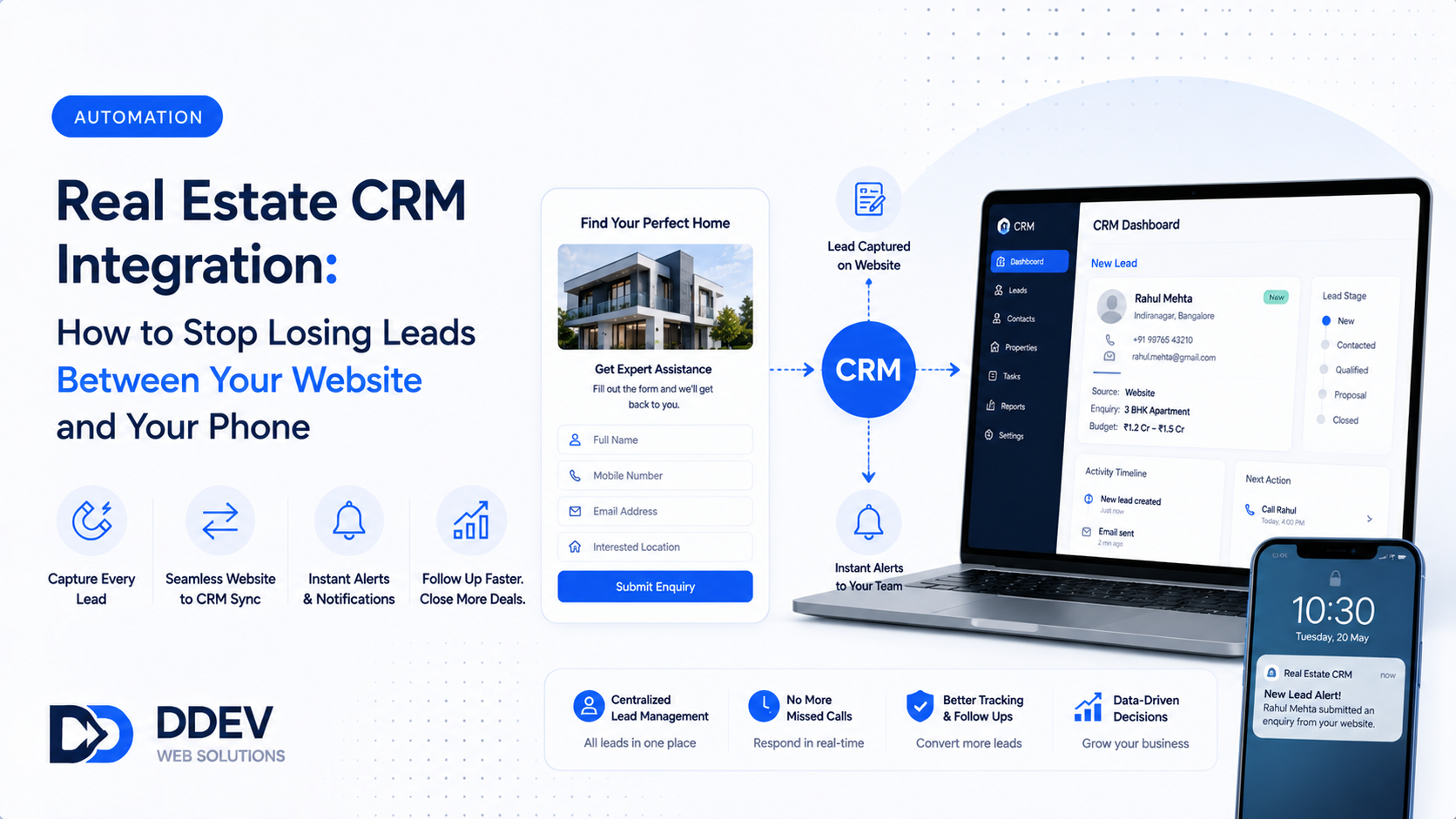
Your real estate website gets traffic. People browse listings. Some fill out enquiry forms. Others call the number on the site.
But what happens to those leads after?
In most agencies, the answer is troubling: the leads go into a WhatsApp group, a shared notebook, or the agent's personal memory. Follow-up depends on whether someone remembers. Status tracking is nonexistent. The same lead might be contacted three times by different agents — or never contacted at all.
This is not a marketing problem. It is a plumbing problem. The water (leads) flows in, but the pipes (follow-up systems) leak.
CRM integration fixes the plumbing. Every lead from your website flows into a structured system where it is assigned, tracked, followed up on, and moved through stages until it converts or closes.
What Happens Without CRM Integration
Lead arrives via website form → Gets emailed to info@agency.com → Sits in an inbox for 3 hours → Agent eventually calls → No record of the call → Follow-up? Maybe next week. Maybe never.
Lead calls the website number → Receptionist takes a name and number on a sticky note → Sticky note gets lost under other papers → Lead calls a competitor who picks up faster.
Lead messages on WhatsApp → Message gets read between 10 other conversations → Response sent, but no record of what was discussed → Same lead contacts next month, and the agent has no context.
The pattern: leads arrive, but the system for handling them is informal, memory-dependent, and leaky. Every leak is a lost commission.
What CRM Integration Actually Looks Like
Step 1: Automatic Lead Capture
Every website form submission, phone call, WhatsApp message, and chat inquiry automatically creates a lead entry in your CRM. No manual data entry. No missed leads.
The lead record includes: source (which page/form), contact details, property interest, timestamp, and any notes from the initial message.
Step 2: Instant Assignment
Leads are automatically assigned to an agent based on rules you define: by geography (Whitefield leads go to Agent A), by property type (commercial leads go to Agent B), or round-robin (equal distribution).
No arguments about who gets which lead. No cherry-picking. No orphaned leads.
Step 3: Automated First Response
Within seconds of lead capture, an automated WhatsApp message goes to the lead: "Thank you for your interest in [Property/Area]. [Agent Name] will contact you shortly." This buys time while the human response is prepared.
Step 4: Follow-Up Tracking
The CRM shows each lead's status:
- New — Just captured, not yet contacted
- Contacted — First call/message made
- Interested — Actively engaged, site visit scheduled
- Site Visit Done — Property shown, feedback received
- Negotiation — Offer/counteroffer stage
- Closed Won — Transaction completed
- Closed Lost — Lead went with competitor or dropped out
Every stage has timestamps and notes. Agents see their pipeline at a glance. Managers see the full team's performance.
Step 5: Automated Reminders
The CRM sends reminders for overdue follow-ups. If a lead has been in "Contacted" status for 3 days with no update, the agent gets a nudge. If a site visit was completed but no follow-up happened within 24 hours, the system flags it.
This eliminates the biggest lead killer in real estate: the forgotten follow-up.
The Revenue Impact
Consider a mid-sized agency generating 100 leads/month from its website.
Without CRM: 20-30% of leads are never properly followed up. That is 20-30 lost opportunities per month.
With CRM: Lead response time drops to under 30 minutes, follow-up rate hits 95%+, and no lead is forgotten.
If even 5 additional leads per month convert into site visits (from the ones previously lost), and 1 of those converts into a transaction — the CRM has paid for itself many times over.
For a property transaction worth ₹80 lakh with a 1% brokerage, that is ₹80,000 from a single recovered lead.
Which CRM Should You Use?
The right CRM depends on your team size and budget:
Small agencies (1-5 agents): Google Sheets + Zapier automation works for the first few months. Once volume increases, move to a purpose-built system.
Mid-sized agencies (5-20 agents): Purpose-built real estate CRMs or general CRMs (like HubSpot, Zoho, LeadSquared) configured for real estate workflows. Integration with your website, WhatsApp, and listing portals is essential.
Large agencies (20+ agents): Enterprise CRMs with custom workflows, reporting dashboards, and integration with property management systems.
The tool matters less than the discipline. A team that religiously uses a Google Sheet will outperform a team that has Salesforce but never opens it.
Frequently Asked Questions
How much does CRM integration cost?
Integrating a CRM with your website typically costs ₹15,000-50,000 for setup, plus ₹1,000-5,000/month for the CRM subscription depending on the platform and number of users.
Can I integrate with WhatsApp Business API?
Yes. WhatsApp Business API integration allows automated messages, broadcast lists, and conversation tracking within your CRM. This is different from regular WhatsApp — it requires API access and a verified business account.
Will my agents actually use the CRM?
Adoption depends on simplicity and enforcement. If updating a lead takes more than 30 seconds, agents will skip it. Choose a mobile-friendly CRM and make it a non-negotiable part of daily workflow.
What about leads from 99acres and MagicBricks?
Most real estate CRMs can capture leads from portal emails via email parsing. This gives you a single dashboard for all lead sources — website, portals, calls, and walk-ins.
Stop Losing Leads to Bad Plumbing
DDev builds real estate websites with CRM integration — automated lead capture, instant assignment, WhatsApp follow-ups, and pipeline tracking so no enquiry ever falls through the cracks.
Talk to DDev About Fixing Your Lead Pipeline.